Windows 10 end of support: what it means and what to do now
Quick answer: Microsoft ended support for Windows 10 on October 14, 2025. Your PC still works, but it only gets security updates if it is enrolled in Extended Security Updates (ESU), which Microsoft has extended for home users until October 12, 2027. If your PC can run Windows 11, the free upgrade is the best long-term fix; if it can't, enroll in ESU now and plan your next PC before late 2027.
If you still use Windows 10, you have probably seen full-screen reminders, news about "end of life", and conflicting dates. This guide cuts through it: what has actually stopped, what still works, the dates that matter today, and a simple way to decide what to do with your PC.
The dates that matter
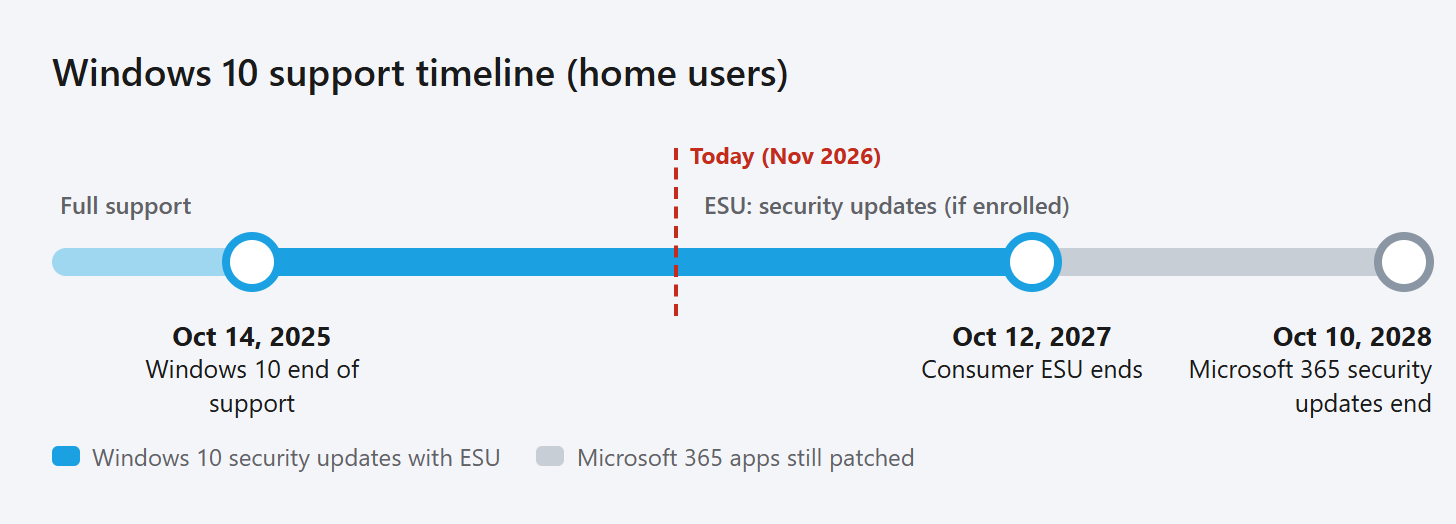
| Date | What happens |
|---|---|
| October 14, 2025 | Windows 10 end of support. No more free security updates, fixes or technical support for PCs that are not enrolled in ESU. Office 2016 and Office 2019 also lost support. |
| October 2026 | Support for Office 2021 and Office LTSC 2021 ended on all versions of Windows. |
| October 12, 2027 | The consumer ESU program ends. This was extended from October 13, 2026; enrolled PCs continue automatically. |
| October 10, 2028 | Microsoft stops security updates for Microsoft 365 apps running on Windows 10. |
What "end of support" actually means
- Your PC keeps working. Windows 10 does not shut down, lock you out or delete anything. Your files and apps stay where they are.
- Security fixes stop unless the PC is enrolled in ESU. New vulnerabilities found in Windows 10 are no longer patched for everyone else, which makes an unprotected PC an easier target for malware, especially when you browse, open email attachments or use online banking.
- No new features or non-security fixes, even with ESU. ESU only delivers critical and important security updates for Windows 10 version 22H2.
- No technical support from Microsoft for Windows 10 problems.
Which option is right for you?
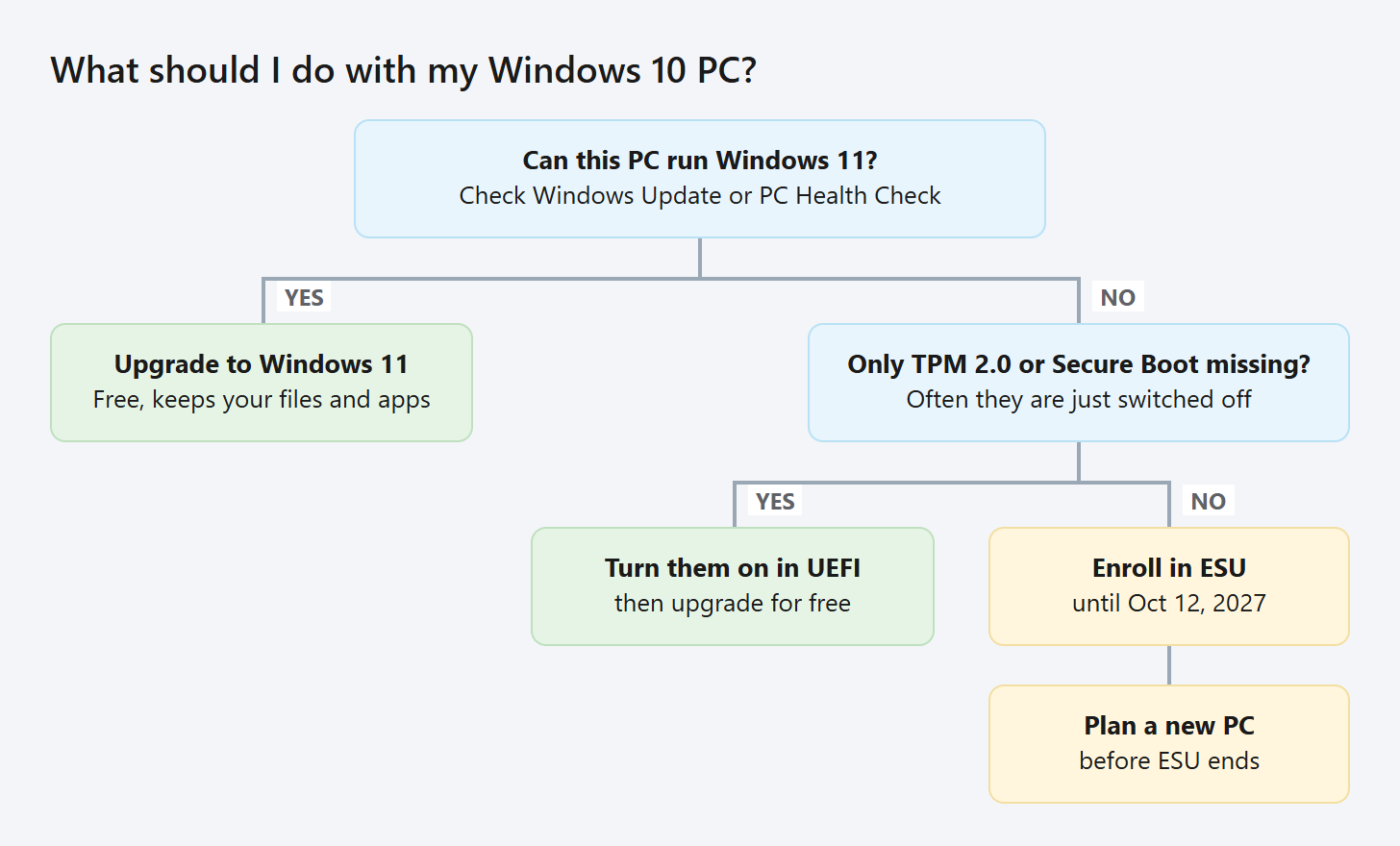
First, check whether your PC can upgrade. Open Settings > Update & Security > Windows Update. If Windows 11 is offered, your PC is eligible. If it isn't, run Microsoft's PC Health Check app, which tells you exactly which requirement is missing. Our guide to Windows 11 requirements explains each one and how to fix common blockers such as TPM 2.0 or Secure Boot being switched off.
Option 1: Upgrade to Windows 11 for free (best if your PC qualifies)
Eligible Windows 10 PCs can upgrade to Windows 11 at no cost, keeping their files and apps. Windows 11 receives regular security and feature updates, so this ends the problem instead of postponing it. Back up your files first, then follow the steps in our Windows 11 upgrade guide.
Option 2: Enroll in Extended Security Updates (best if your PC can't upgrade yet)
ESU keeps your Windows 10 PC protected with security updates until October 12, 2027. There are three ways to enroll:
- No extra cost if you sync your PC settings with Windows Backup to your Microsoft account
- 1,000 Microsoft Rewards points
- A one-time purchase of US$30 (or the local equivalent) plus tax
One ESU license can be used on up to 10 devices. In the European Economic Area, the enrollment options and timing can differ.
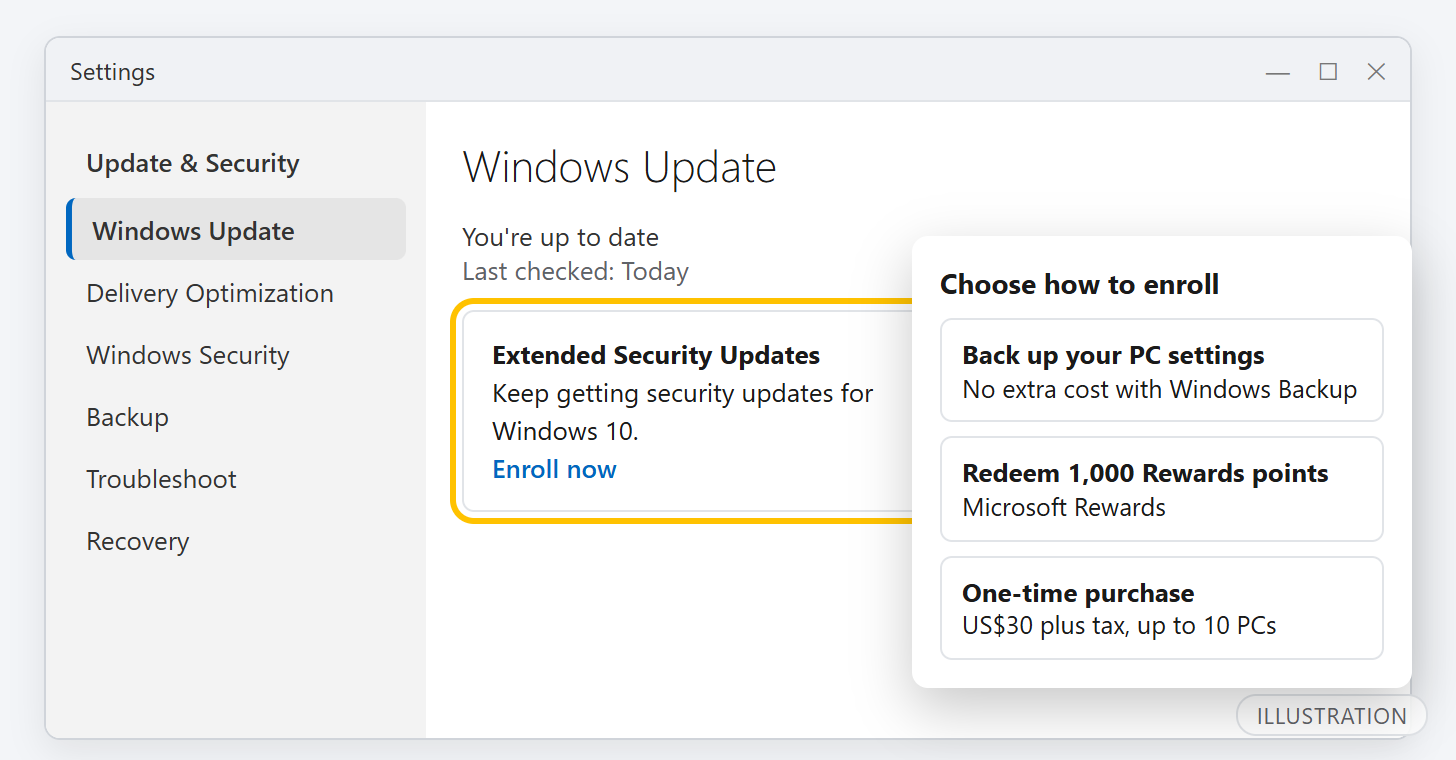
To enroll:
- Make sure the PC runs Windows 10 version 22H2 with the latest updates. To check, press Windows + R, type
winverand press Enter. - Sign in with a Microsoft account that is an administrator on the PC. A child account cannot enroll, and if you use a local account Windows asks you to switch.
- Open Settings > Update & Security > Windows Update and select the ESU enrollment link.
- Choose one of the three options and finish the wizard.
If you already enrolled before the extension, you don't need to do anything: your coverage continues automatically until October 12, 2027. Kiosk PCs, PCs joined to a company domain or Microsoft Entra ID, and PCs managed by an MDM service cannot use the consumer program; those need commercial ESU through the organization.
Option 3: Replace the PC (when it is old or failing)
If your PC is several years old, can't run Windows 11 and is already slow, ESU buys time but doesn't fix the underlying problem. Use the extra time to choose a replacement without pressure. When you switch, copy your files across, then reset the old PC before you sell, donate or recycle it.
Practical tips if you stay on Windows 10 for now
- Keep Windows Update running. ESU updates arrive through Windows Update like before.
- Keep your browser and apps updated. Many attacks target the browser, PDF readers and other apps, not just Windows itself.
- Back up important files to an external drive or cloud storage. A backup protects you from failing hardware and ransomware alike.
- Ignore pop-ups and calls about "Windows 10 expiring". Microsoft will never phone you to sell support or ask for payment by gift card. Enrollment happens only in Settings.
Frequently asked questions
Will my Windows 10 PC stop working?
No. It keeps starting and running normally. What stopped is the flow of free security updates and support, which is why ESU or an upgrade matters.
Is the Windows 11 upgrade still free?
Yes. Eligible Windows 10 PCs can upgrade through Windows Update in Settings at no cost.
When does Windows 10 ESU end for home users?
On October 12, 2027. Microsoft extended the consumer program, which was originally due to end on October 13, 2026.
Can I still use Microsoft 365 on Windows 10?
Yes. Microsoft 365 apps keep running, and Microsoft provides security updates for them on Windows 10 until October 10, 2028, although it recommends moving to Windows 11.
Do I need ESU if I upgrade to Windows 11?
No. ESU is only for Windows 10. Once your PC runs Windows 11, it gets updates through the normal Windows 11 servicing.